Day-Forward Scanning & Backfile Scanning, What is Right for You?
As digital storage becomes more affordable and accessible, many Public and Private organizations are moving away from physical documents altogether, choosing instead to store their records electronically.
As we all know, paper-based recordkeeping results in lower productivity, higher costs, and poor data security, but it can be difficult for those with a large volume of paper documents to move everything into an electronic system without interrupting their day-to-day work, especially when new documents continue to pile up.
To solve this, you should look at a two-pronged approach to digitizing your records: backfile scanning to digitize archived records and day-forward scanning to manage the newly generated.
Let’s explore the differences between these two approaches, when each is most effective, and how they work together to improve records management.
What is Backfile Scanning?
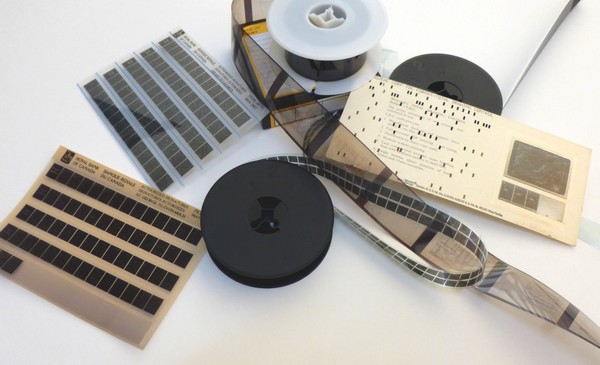
Backfile scanning is the process of converting paper documents, microfilm, and other hard-copy records into digital files for electronic storage and access.
Backfile scanning projects are typically large in scale, involving the bulk scanning of records that have accumulated over time.
For anyone storing documents in warehouses or offsite facilities, backfile scanning provides an opportunity to digitize these archives and store them more efficiently.
While backfile scanning is an effective way to digitize historical records, it can also be a massive undertaking for anyone to handle on their own. Coordinating the logistics of such a large project, along with the technical requirements, can be overwhelming, especially when trying to maintain normal operations at the same time. For this reason, many businesses work with companies like Global Document Services to help facilitate this process.
What Are The Benefits of Backfile Scanning?
Backfile scanning makes it easier for businesses to manage and store their existing records. By converting paper or microform documents into digital files, businesses can reduce the headaches that come with managing large volumes of physical records while gaining better access to the information they need.
Reduced Costs
From a cost perspective, storing your archived files digitally rather than on paper is a no brainier. Instead of paying hefty fees to store your records in an offsite storage facility, you can store them securely as digital files in the cloud at a fraction of the cost.
Backfile scanning doesn’t just reduce storage expenses, it also helps you create a more efficient and productive workforce.
Every minute employees spend looking through filing cabinets, paper piles and rolls of microfilm to find what they need is a minute wasted, and as we all know, time is money. Digitizing your records makes it easy to find and retrieve information, giving your team more time to focus on tasks that matter.
Another hidden cost of paper recordkeeping is wasted space. Real estate is expensive, and dedicating valuable square footage to document storage is, to put it mildly, a missed opportunity. By getting rid of bulky filing cabinets and bankers’ boxes full of documents or cabinets of microfilm, you can reclaim that space for better purposes, whether it’s adding workstations, creating collaborative areas, or simply giving your team a little more room to breathe.
Efficient Access to Records
Backfile scanning is one of the best ways to make your archived records more accessible.
Finding physical documents within a large archive can take up a lot of time, digitized records, on the other hand, can be retrieved with simple text-based searches, allowing employees to find exactly what they need without ever leaving their desks.
Physical records also make it difficult for employees to share information and collaborate. A document can only be in one employee’s hands at any given time and figuring out who has the file you need when you need it can be a major headache. Once your documents have been scanned, multiple team members can access the same file at the same time. This makes it much easier to collaborate, especially records shared across departments or teams.
Reduced Filing Errors
Large physical archives are especially prone to filing errors. Every time an employee retrieves a file, uses it, and refiles it, there’s a chance of mistakes. Misplacing or misfiling a document can make it nearly impossible to locate the next time it’s needed, resulting in lost information and unnecessary headaches. Even with well-intentioned employees, mistakes happen, it’s just human nature.
Backfile scanning eliminates this problem by converting your entire archive into an organized, digital system. Employees can access and use documents without physically moving them, keeping your filing system organized and error-free. This allows your team to focus on their actual job responsibilities instead of worrying about document management, while eliminating the wasted time and frustration of trying to track down misplaced documents.
Improved Security
Data security is another key reason to consider backfile scanning as storing critical information on physical documents or microfilm exposes your business to unnecessary risks. Paper records can be stolen, misplaced, damaged, or destroyed, often with little to no oversight. They’re also vulnerable to unauthorized access. Bad actors can view, copy, or distribute sensitive information without leaving a trace.
Digitizing your records through backfile scanning helps address these risks by allowing you to take advantage of security features that physical documents simply can’t offer.
For example, electronic records allow you to track and audit access, with every file view or edit recorded. This ensures you have complete visibility of who is accessing your data and when.
You can also restrict access to specific departments or employees, reducing the likelihood of sensitive information falling into the wrong hands.
Finally, multiple copies of your digital records can be stored securely in the cloud, creating a reliable backup should things go wrong. If a disaster strikes, whether it’s a fire, flood, or a security breach, you’ll have a protected copy of your data ready to restore.
What is Day-Forward Scanning?
Day-forward scanning is the process of digitizing physical documents as they are generated, so that they can be immediately integrated into an existing electronic filing system. Day-forward scanning is perfect for businesses that still work with paper documents but want to operate as paperless as possible.
By digitizing new records as they come in, businesses can prevent the accumulation of paper files over time and ensure all their records exist in one place, rather than being spread across multiple filing systems.
Day-forward scanning eliminates the need for backfile scanning projects down the line. It’s a proactive way to maintain an electronic recordkeeping system in a mixed paper and digital business environment.
What Are the Benefits of Day-Forward Scanning?
Day-forward scanning is a practical way for businesses to streamline records management. It simplifies how records are maintained, ensures data is centralized, and supports compliance with regulatory requirements.
Simplify Records Maintenance
Day-forward scanning prevents businesses from having to maintain separate systems for physical and digital records. By converting incoming paper documents into digital files right away, businesses can seamlessly integrate new records into their existing electronic filing system.
This reduces the cost of records management since only one system needs to be maintained. It also ensures that both archived and active files are accessible in the same place, making it easier for employees to find the information they need without searching across multiple systems.
With everything organized in a single digital system, employees can work more efficiently and focus on tasks that matter most.
Centralize Data
Day-forward scanning bridges the gap between paper documents, microfilmed documents and electronic records, making it possible to extract and share data from within handwritten or printed documents.
As new documents are generated by your business, extracted data is made available instantly across your organization, improving communication across departments and making collaboration easier for employees.
Combining all records, both new and historical, into one centralized system, businesses can analyze their data to make better informed business decisions.
Meet Compliance Obligations
Many public and private organizations are required to retain certain documents for extended periods to comply with regulatory standards. In the event of an audit, relying on large paper archives can make it challenging to produce specific records quickly. Delays in locating the right documents may lead to serious consequences, including fines or legal fees.
Day-forward scanning simplifies this process by making relevant files easy to locate and deliver. Instead of searching through filing cabinets or paper piles, businesses can retrieve the required documents quickly from a centralized, digital system.
What Is the Difference Between Backfile Scanning and Day-Forward Scanning?
As you have probably guessed by now, day-forward scanning and backfile scanning are two sides of the same coin. Often, day-forward scanning is performed in tandem with backfile scanning and is part of a larger records management plan.
When combined, these methods create a clear path for businesses looking to move away from paper recordkeeping. Backfile scanning helps you digitize older records that aren’t actively created anymore but might still need to be accessed occasionally for legal or regulatory reasons. Day-forward scanning helps you digitize new documents as they’re generated, keeping everything organized and up to date within your electronic recordkeeping system.

Which Comes First, Backfile Scanning or Day-Forward Scanning?
If you’re dealing with a backlog of historical records that need to be digitized and a steady flow of new documents coming in, it can be difficult to know where to start. Every business is unique, each situation is different, and depending on your requirements, it may make sense to prioritize one over the other.
For many businesses, starting with day-forward scanning is the best choice. It creates an immediate impact by allowing employees to begin working with digital files right away. This approach works particularly well if your backlog consists of records that aren’t accessed frequently. On the other hand, businesses preparing for a move or downsizing may benefit from tackling their backlog first. Eliminating paper archives reduces storage needs, which can make these kinds of transitions much smoother. Timing can also play a role in your decision. If your business is in its busiest season, prioritizing active documents might not be ideal since those records are often in use and may need to be pulled from the scanning process.
Ultimately, there’s no one-size-fits-all answer. The right approach depends on your specific goals and operational needs.
What Comes Next?
Whether you’re ready to implement a day-forward scanning program, digitize your backlog of historical records, or tackle both, Global Document Services is here to help.
With over 30 years of document scanning expertise, our well-trained team is committed to delivering results you can count on. We’ll handle the details, so you can focus on what matters most to your business. Plus, our top-rated customer service ensures a smooth and hassle-free experience every step of the way.

To get started, request a free quote or give us a call at (800) 472-9716.

Thomas Ripple
New Business Development Executive that Leads, Educates & Motivates with Passion, Principal & Purpose.